Why there are no leads in my campaign
Follow one checkout from your store to a campaign run, in the order ACR checks it, and see which screen shows where it stopped.
Last reviewed November 7, 2026
Start with one shopper's events
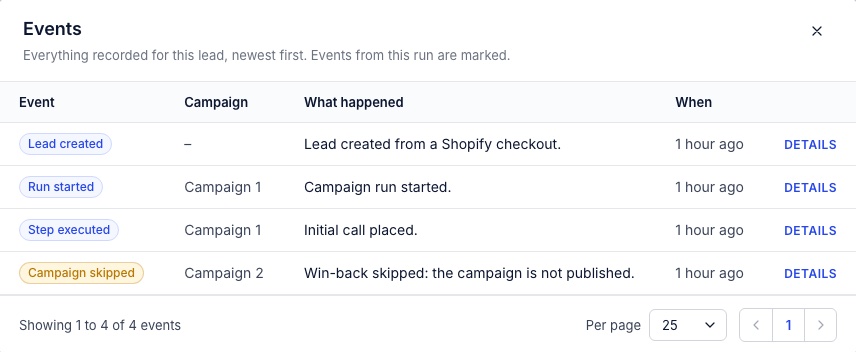
Open Leads with no campaign picked. The campaign picker lists only leads who have had a run in that campaign, so a skipped lead is missing from it. Open a recent lead and press Events. The newest rows tell you where to look next.
| What you see | What it means |
|---|---|
| No recent leads at all | ACR is not getting checkouts. Go to Nothing reaches ACR. |
| Lead created or Checkout started, then nothing | The wait has not passed yet. Go to The wait has not passed. |
| Order received | The shopper bought before the wait ended, so no run started. |
| Checkout abandoned, then nothing | No published campaign takes this lead source. Go to The campaign is not live. |
| Campaign skipped, with a reason | A published campaign looked at the lead and passed. Go to What each skip reason means. |
| Campaign started, for a different campaign | Another campaign got there first. Go to Another campaign takes the lead first. |
Nothing reaches ACR
The check depends on the campaign's lead source.
- Shopify. The Lead source step must show Reading checkouts. If it shows Not reading checkouts yet, an admin presses Start reading checkouts under Integrations. Until then ACR ignores every checkout and order from the store.
- Custom API. ACR takes events only while the Checkout abandoned trigger is on. With the trigger off, the trigger URL still answers 200 and stores nothing, so your system's logs look fine. A
checkout/updatedevent also needs aunique_id. - File upload. These campaigns get no checkouts. A lead joins when you turn on Start a campaign for each imported lead during an import, or use Assign lead campaign on the lead's page. See Adding leads.
- Klaviyo. ACR does not read from Klaviyo today, so a campaign with this lead source gets no leads.
Two more limits apply to every source. A checkout becomes a lead only once it has an email or a phone number, so one with neither never reaches a campaign. And ACR does not fetch checkouts from before reading started, apart from the two hours the Growth Dept connection looks back on its first read.
The wait has not passed
A checkout counts as abandoned after 30 minutes with no activity, by default, and every update from the shopper restarts that clock. You set the wait on the Checkout abandoned trigger, in the Lead source step. When several published campaigns with their trigger on share a lead source, ACR uses the shortest wait among them.
A checkout with no activity for more than 7 days expires and never starts a campaign.
The campaign is not live
Read the badge on the Campaigns list. Only Running takes shoppers.
- Setup not finished means the campaign was never published. Open Review & launch and press Review and publish. Publishing does not switch the trigger on, so do that next.
- Paused means one of two things: someone paused it from the row menu, or it is published with its Checkout abandoned trigger off. Use Resume campaign for the first, and the switch on the Lead source step for the second.
A draft or a paused campaign leaves no Campaign skipped row on the lead. A published campaign with its trigger off does.
Another campaign takes the lead first
Campaigns on the same lead source form one ordered list, shown under Who to contact on the Start conditions step. The first campaign that accepts a lead gets it. A campaign with no conditions shows Takes every shopper, and any campaign below it shows Never reached: a campaign above takes everyone. Move yours up with the arrows, or give the one above it conditions. Campaign overrides can also change which campaign wins. Campaigns below the winner get no Campaign skipped row.
A/B test variants take shoppers only while their test runs. Once a test ends, its variants get no new checkouts, even with the trigger switched back on, and no row says why. To keep using a variant, duplicate it, publish the copy and switch on the copy's trigger.
What each skip reason means
These are the words in the What happened column, after Campaign skipped.
| Reason | What to change |
|---|---|
| The campaign's trigger is off. | Switch on Checkout abandoned in the Lead source step. |
| The campaign reached its dispatch limit. | Raise Most shoppers this campaign takes on the Start conditions step, or press Reset the count on the Lead source step. |
| The lead was in this campaign within its cooldown period. | By default the same shopper can start again 30 days after their last run in this campaign started. Change Days before the same shopper can start again under Custom limits. |
| Start conditions not met for this campaign. | Read the formula under Who to contact, then edit or remove it. |
| The lead is already in a running campaign. | A lead has one open run at a time. Wait for it to end, or press Cancel run. |
| Waiting for a phone number before outreach. | Your Custom API event asked ACR to wait for a phone number. Send an update that includes one. |
| The lead has not consented to any channel this campaign uses. | Open Metadata on the lead to see what is recorded. Consent explains what each channel needs. |
| The lead opted out of every channel this campaign uses. | An opt-out always wins. See Opt-outs. |
| The lead's contact details are on the suppression list. | See Opt-outs. |
| The campaign does not allow the lead's country. | New campaigns allow the US and Canada. Add others on the Geo permissions step. A lead with no known country counts as not allowed. |
| The recommended schedule sends no calls or texts to the lead's state. | Texas is one such state. See Quiet hours. |
| The lead has no phone number or email this campaign can use. | The channels switched on need a contact detail this lead lacks. |
| The lead's state (…) stops outreach. | Asked not to be contacted, Blocked, Disqualified, Unreachable, Redacted and Hand-off requested all stop outreach. If the state is wrong, press Edit on the lead. |
The checks on consent, suppression, country and contact details reject a lead only when no channel of the campaign can be used. If one channel passes, the run starts and steps on the other channels are skipped one at a time.