Conversation intelligence
Read the agent's answers to your evaluation questions conversation by conversation, or added up over a date range.
Last reviewed November 7, 2026
Reading answers one by one
Open Conversation intelligence in the sidebar and pick a campaign. Each campaign asks its own questions, so there is no all-campaigns view, and the page opens on your first active campaign. If two campaigns ask the same question, look at each in turn.
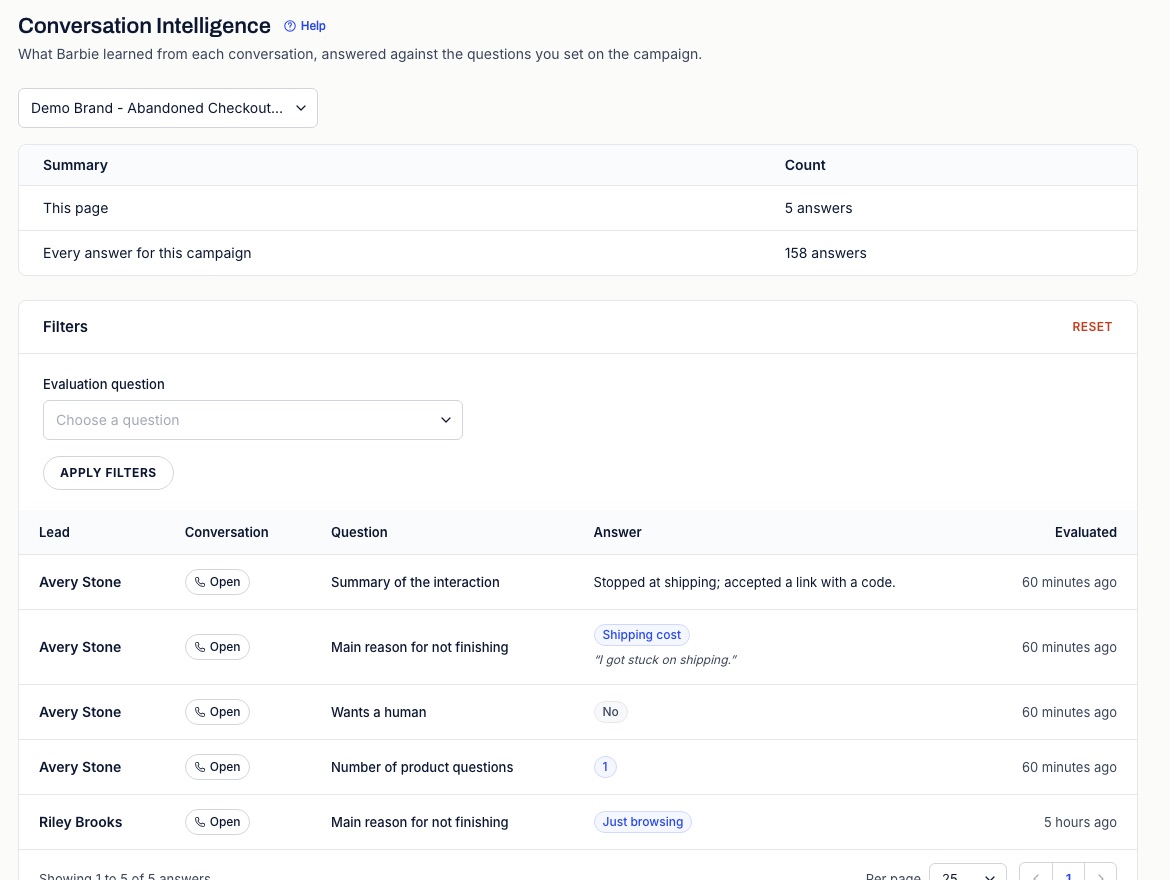
Each row shows the Lead, a Conversation button that opens the call or thread, the Question, the Answer and when it was Evaluated, newest first. Under an answer you may see, in quotes, the words it was based on. Answers taken from the voice provider's call analysis show "From the call analysis." instead. The Summary card counts the answers on this page and every answer for the campaign, or for the question you filtered on.
Filtering by question and answer
- Choose an Evaluation question.
- Set the answer you want. Yes / No questions offer Yes or No, Classified questions offer their labels, Number questions take a From and To, and Text questions take an Exact answer, which must match the whole answer (letter case is ignored).
- Select Apply filters. Reset clears them.
This page has no date filter. To see answers within a date range, use the Interaction Evaluations tab.
Answers added up
Analytics > Interaction Evaluations counts the answers for one campaign over the date range you pick: the yes and no split, how often each label came up, and how many conversations gave each score, with the average. Text answers are not counted. Read answers on any card opens them here, filtered to that question.
When answers appear
- Calls: after the call ends. The voice provider answers up to 20 of the campaign's questions in its call analysis, and the text AI answers the rest from the transcript.
- Text and email threads: about 30 minutes after the shopper's first reply, from the thread as it stands then. A thread the shopper never replied to gets no answers. Neither does one whose first reply opted out, asked for a person or went to Needs review.
- No text AI: if the store has no text AI available, threads get no answers and calls get only what the voice provider answered.
An answer that does not fit the question's format, such as a score outside its range or a label you did not define, shows as No answer. Questions only score conversations after they are published; Set up conversation evaluations explains why.
Putting answers to use
The starting questions on a recovery campaign point at specific fixes:
- Main objection keeps coming back as shipping_cost or price: say in the campaign brief how the agent should answer it, or review the codes in the Offer step.
- Asked for a person is often yes: check which hand-off reasons are switched on in General settings.
- Conversation quality is low: open a few of those conversations and read what the agent said.